SecuX V20 Review: A Big Touchscreen With a Closed-Source Catch
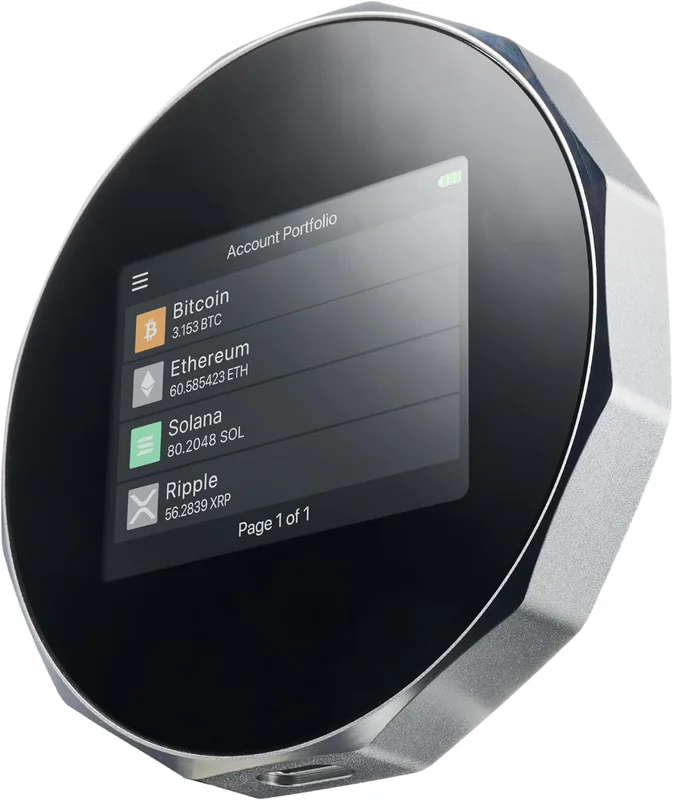
The SecuX V20 pairs a genuinely useful 2.8-inch touchscreen with an EAL5+ Infineon secure element, and the Taiwan-based company has a decent track record. The problem is the price-to-transparency ratio: at $119 you are paying more than a Trezor Safe 3 for firmware nobody outside SecuX can audit. It is a competent, comfortable wallet, but security-conscious Bitcoin holders can get verifiable designs for less money.
Design and Build Quality
The SecuX V20 is one of the larger hardware wallets on the market, closer to a small puck than a USB stick. The diamond-cut aluminum backplate and rounded polycarbonate face give it a substantial, well-finished feel, and at 121g it is clearly built to sit on a desk rather than hide in a coin pocket.
The headline feature is the 2.8-inch color touchscreen — larger than anything Trezor or Ledger offered at this price for years. Addresses display in full, transaction details are legible without scrolling, and PIN entry happens directly on the device. If squinting at tiny screens is what has kept you away from hardware wallets, the V20 removes that objection completely.
Security
SecuX built the V20 around an Infineon SLE solid Flash secure element certified to CC EAL5+. That is a real, bank-grade chip that protects the seed against physical extraction — a genuine advantage over secure-element-free designs like the KeepKey. PIN protection, on-device confirmation, and BIP-39 recovery round out a conventional but sound architecture.
The weakness is transparency. The firmware is closed-source, so unlike Trezor or BitBox02, independent researchers cannot verify what the code actually does — you are trusting SecuX's word and its Taiwan-based engineering team. Bluetooth connectivity, while convenient, also adds a wireless attack surface that cable-only wallets avoid. Neither issue is disqualifying, but together they explain why the V20 ranks below the open-source leaders.
Software and Usability
The V20 pairs with the SecuXcess web application on desktop and a mobile app over Bluetooth. Setup is straightforward: create a PIN on the touchscreen, write down the recovery seed, and verify it on the device. User feedback consistently praises the onboarding as beginner-friendly.
Day-to-day, the touchscreen does most of the heavy lifting — confirming a transaction feels closer to using a phone than fiddling with two buttons. The trade-off is that SecuX's software ecosystem is thinner than the majors: fewer third-party wallet integrations than Trezor or Ledger, a smaller community when something breaks, and firmware updates that arrive on a slower, less predictable cadence.
Coin Support
SecuX advertises support for roughly 1,000 coins and tokens, covering Bitcoin, Ethereum and ERC-20 tokens, Litecoin, Bitcoin Cash, Ripple, and other major chains. For a Bitcoin-focused buyer that is more than enough, and for a diversified portfolio it covers the mainstream assets most people actually hold.
It is worth noting the number is much smaller than the 7,000+ figures Ledger and KeepKey quote, mostly because SecuX supports fewer long-tail tokens and chains. If your holdings are Bitcoin plus a handful of majors, the difference is academic. If you hold obscure altcoins, check SecuX's supported-asset list before buying — or consider a Trezor Safe 3, which pairs broader third-party support with open-source firmware at a lower price.
For
- ✓Large 2.8-inch color touchscreen makes verification easy
- ✓Infineon SLE solid Flash secure element (EAL5+ certified)
- ✓Both USB and Bluetooth connectivity
- ✓Supports roughly 1,000 coins and tokens
- ✓Solid diamond-cut aluminum and polycarbonate build
Against
- ✗Closed-source firmware cannot be independently audited
- ✗At $119 it costs more than a Trezor Safe 3 with open firmware
- ✗Bluetooth adds a wireless attack surface some users prefer to avoid
- ✗Companion software is less polished than Trezor Suite or Ledger Live
Affiliate links · price unchanged for you
Claude
AI crypto agent — searches across the entire internet to analyze specifications, security data, and user feedback, delivering research results based on facts and data.