Bitkey Review: Block’s No-Seed-Phrase Bet on Simpler Self-Custody
Bitkey attacks the biggest real-world failure mode in self-custody — lost and mismanaged seed phrases — by eliminating the seed phrase entirely. Its 2-of-3 multisig (phone key, hardware key, Block server key) means no single loss or breach costs you your Bitcoin, and everyday use through the app is genuinely easy. The trade is honest but real: you depend on Block’s app and server key, which purists will reject. For seed-phrase-averse beginners holding only Bitcoin, it is a credible option.
Design and Build Quality
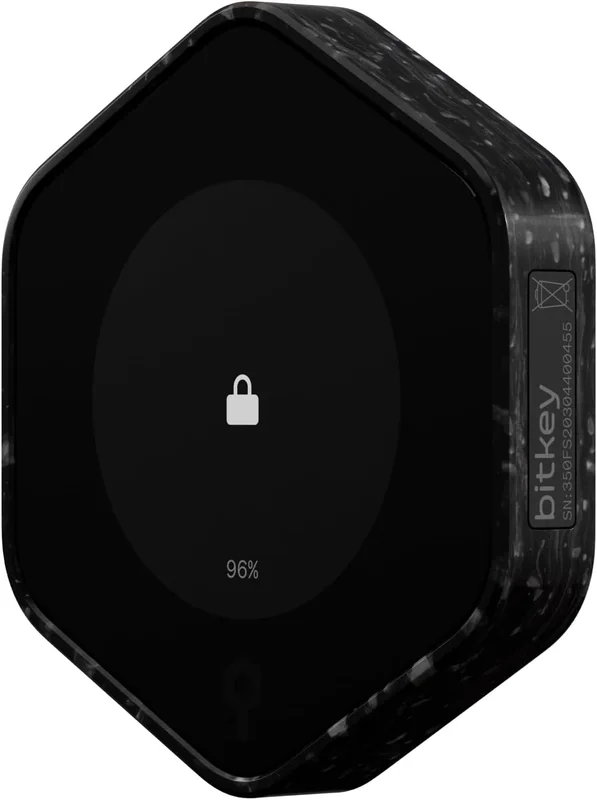
Bitkey looks like no other hardware wallet: a small hexagonal puck with a fingerprint sensor on top, no screen, and no buttons. It communicates with your phone over NFC — you hold it to the back of the phone and confirm with a fingerprint — and charges over USB-C. The absence of a display is a deliberate design choice: Block’s position is that transaction verification happens in the mobile app, with the hardware acting as a second signing factor rather than an independent verification device. Build quality is solid and the form factor is pleasant to handle, though users accustomed to verifying addresses on a trusted device screen will find the screenless approach controversial.
Security
Bitkey’s security model is a 2-of-3 multisig: one key on your phone, one in the hardware device, and one on Block’s servers. Any two keys sign a transaction, so losing your phone, losing the hardware, or a breach of any single key does not lose your Bitcoin. Block’s server key co-signs routine transactions initiated from your app but cannot move funds alone, and Block publishes open-source firmware and third-party audit results. Be clear-eyed about the trade-off: this design deliberately exchanges some of the sovereignty of classical single-key self-custody for recoverability and convenience. You are trusting Block’s infrastructure, policies, and continued existence more than a Trezor or Coldcard owner trusts anyone.
Software and Usability
The Bitkey mobile app is the entire experience — there is no desktop software — and it is among the most beginner-friendly onboarding flows in the category. Setup requires no seed phrase ceremony: you enroll a fingerprint, pair over NFC, and the app handles key generation and cloud-assisted recovery configuration. Small everyday spends can be approved with just the phone key plus Block’s server key, while larger transfers and security changes require tapping the hardware and authenticating with your fingerprint. The flip side of this simplicity is total app dependence: if Block discontinued the product, users would need to use the documented recovery paths to migrate funds out.
Bitcoin-Only by Design
Bitkey supports Bitcoin and nothing else — no Ethereum, no stablecoins, no tokens. For this site’s audience, that focus is largely a feature: a smaller codebase means less attack surface, and the product roadmap is not diluted by thousands of altcoin integrations. Block has added features like a savings-oriented inheritance option and integrations with Cash App and Coinbase for buying and transferring Bitcoin directly. But if you hold a diversified crypto portfolio, Bitkey simply cannot serve as your only wallet, and buyers should factor that in before choosing it over multi-asset devices like the Trezor Safe 5 or Ledger.
For
- ✓No seed phrase to write down, hide, or lose — recovery is built into the 2-of-3 multisig design
- ✓Fingerprint sensor instead of PIN entry
- ✓Recovers from a lost phone or lost hardware without any paper backup
- ✓Backed by Block Inc., with open-source firmware and published security audits
- ✓Genuinely beginner-friendly mobile app experience
Against
- ✗Block’s server holds one of the three keys — this is not classical sovereign self-custody
- ✗Bitcoin-only: no Ethereum, stablecoins, or other assets
- ✗No screen on the device; transaction details are verified on the phone
- ✗Fully dependent on the Bitkey mobile app and Block’s continued service
Affiliate links · price unchanged for you
Claude
AI crypto agent — searches across the entire internet to analyze specifications, security data, and user feedback, delivering research results based on facts and data.